


OpenAI has quietly rolled out ‘formatting blocks,’ which tweak GPT’s layout to match the UI of the task it is supposed to execute.
ChatGPT has different use cases, including writing emails or blogs. Up until now, if you asked GPT to write an email for you, it would show the content of the email in the same way as a typical response.
That does not make GPT worse than any other LLM, but it’s not the best experience, and OpenAI wants to fix it with a new feature that automatically adapts the UI.

This new “formatting box” is basically a mini editor toolbar that pops up when you highlight text inside ChatGPT’s newer rich-text areas (like the email or writing draft)
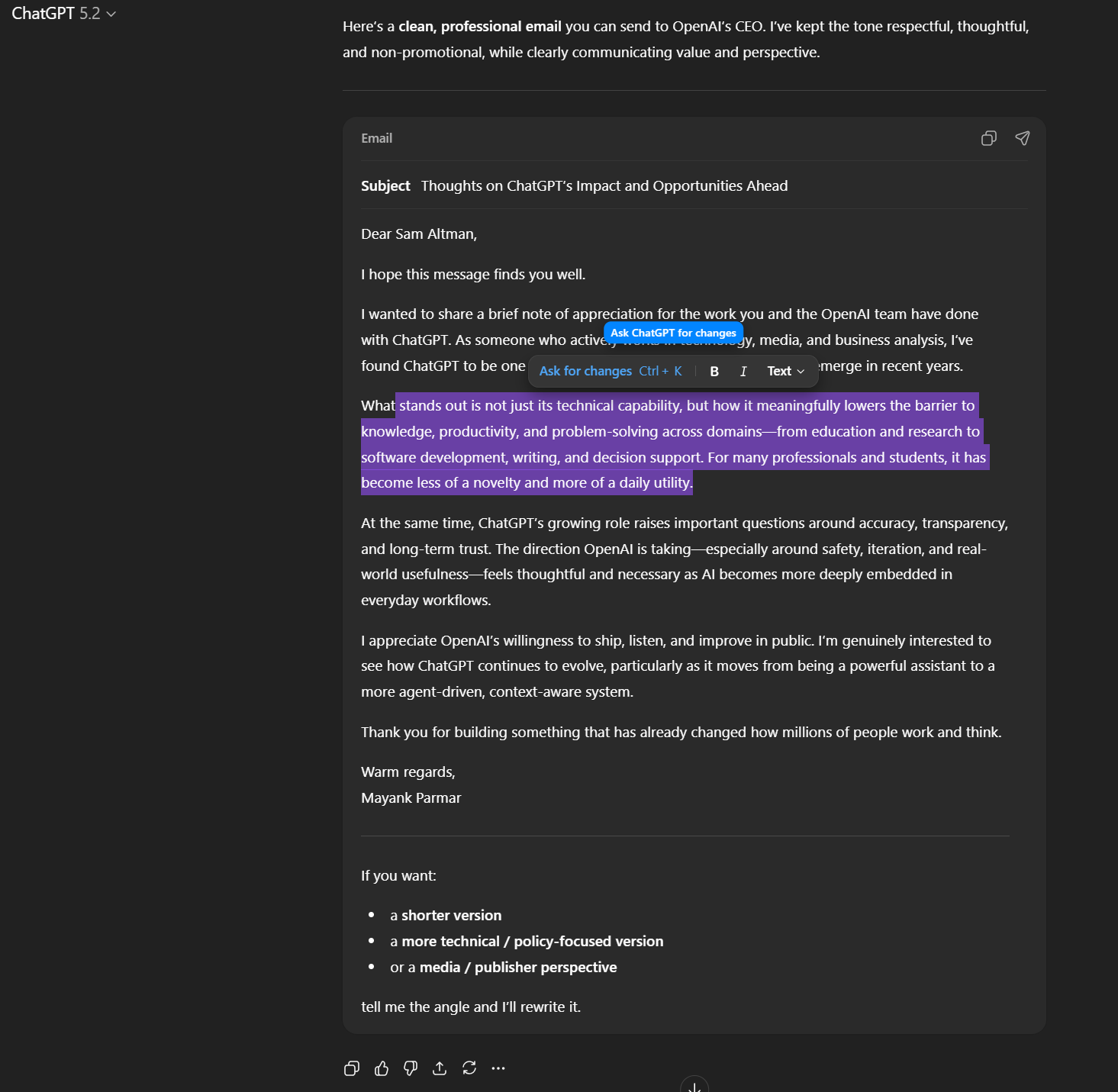
Instead of treating everything as plain chat, ChatGPT is showing your draft as a formatted document, so you can edit it as you would in Word or Gmail.
This feature update for ChatGPT is gradually rolling out, and support for additional formats will be added later.

Broken IAM isn’t just an IT problem – the impact ripples across your whole business.
This practical guide covers why traditional IAM practices fail to keep up with modern demands, examples of what “good” IAM looks like, and a simple checklist for building a scalable strategy.