
Chromium-based ChatGPT Atlas browser is testing a new feature likely called “Actions,” and it can also understand videos, which is why you might see ChatGPT generating timestamps for videos.
ChatGPT Atlas is a web browser where ChatGPT is built into the browsing experience
Instead of switching between tabs and copying links or screenshots into ChatGPT, you can ask questions and get help right inside the page you’re on.

It can understand what you’re looking at, help you research, explain things, and complete tasks while you browse.
Atlas can also remember context if you enable “browser memories,” so it can bring back useful details from sites you visited earlier (like job posts you were comparing).
There’s also an “agent mode” that can open tabs and click through workflows for you, with safety limits and extra caution on sensitive sites.
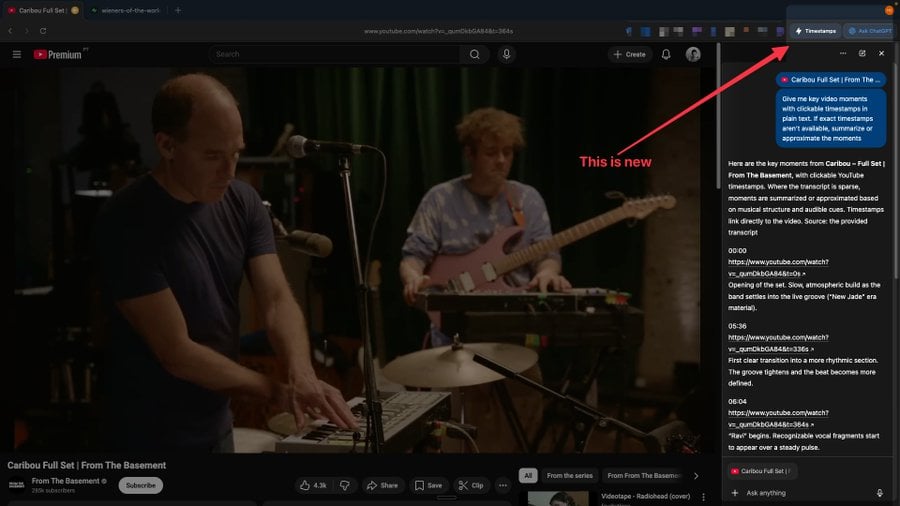
As spotted on X, it looks like ChatGPT browser can now understand video, especially YouTube videos. Some users spotted that Atlas now offers a “Timestamps” button, which allows AI to pull timestamp from YouTube into the sidebar.
In the release notes, OpenAI confirmed that it rolled out an update recently, and it focuses heavily on stability and smoother day-to-day use.
It fixes a bug that could cause memory overuse, and adds better “what to ask next” suggestions when the Ask ChatGPT sidebar is closed.
There are lots of quality-of-life upgrades across tabs, search, and UI polish. Tab Search now shows your five most recent tabs when it’s empty, and Cmd+K can trigger tab search.
OpenAI has also planned to release Atlas for Windows 11.

It’s budget season! Over 300 CISOs and security leaders have shared how they’re planning, spending, and prioritizing for the year ahead. This report compiles their insights, allowing readers to benchmark strategies, identify emerging trends, and compare their priorities as they head into 2026.
Learn how top leaders are turning investment into measurable impact.