
Microsoft has released Windows 11 KB5077181 and KB5075941 cumulative updates for versions 25H2/24H2 and 23H2 to fix security vulnerabilities, bugs, and add new features.
Today’s updates are mandatory as they contain the February 2026 Patch Tuesday security patches for vulnerabilities discovered in previous months.
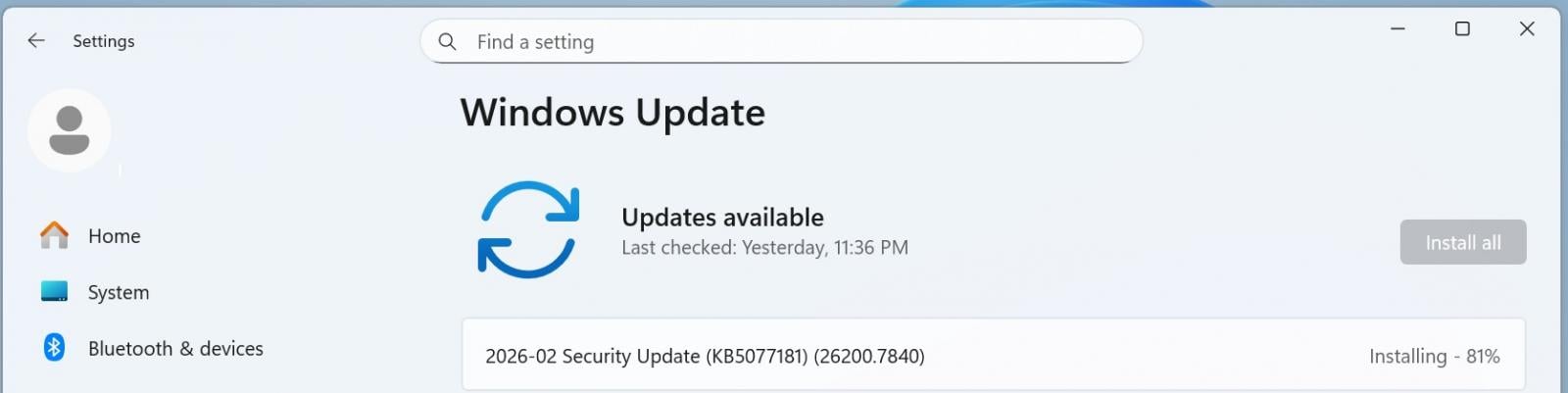
You can install today’s update by going to Start > Settings > Windows Update and clicking on ‘Check for Updates.’
Source: BleepingComputer
You can also manually download and install the update from the Microsoft Update Catalog.
This is the third ‘Patch Tuesday’ release for version 25H2, but as it’s based on version 24H2, there are no exclusive or special changes. You’ll get the same fixes across the two versions of Windows 11.
What’s new in the February 2026 Patch Tuesday update
After installing today’s security updates, Windows 11 25H2 (KB5077181) will have its build number changed to Build 26200.7840 (or 26100.7840 in case of 24H2), and 23H2 (KB5073455) will be changed to 226×1.6050.
This update mostly contains bug fixes, and here’s everything you need to know:
-
[Gaming] Fixed: This update addresses an issue that determines device eligibility for the full-screen gaming experience.
-
[Networking] Fixed: This update addresses an issue that prevented some devices from connecting to certain WPA3‑Personal Wi‑Fi networks. The issue might occur after you install KB5074105.
-
[Secure Boot] With this update, Windows quality updates include a broad set of targeting data that identifies devices and their ability to receive new Secure Boot certificates. Devices will receive the new certificates only after they show sufficient successful update signals, which helps ensures a safe and phased rollout.
-
[Cross Device Resume] New! This update expands the functionality of Cross‑Device Resume, which Microsoft first introduced in the May 2025 Windows non-security update (KB5058499). You can continue activities from your Android phone on your PC based on the apps and services you use, including resuming Spotify playback, working in Word, Excel, or PowerPoint, or continuing a browsing session.
-
Vivo Android phone users can continue browsing from Vivo Browser on their PC.
-
If you use an Android phone from HONOR, OPPO, Samsung, vivo, or Xiaomi, you can resume online files that you opened in the Microsoft Copilot app on your phone and continue working on them on your PC. Files open in the corresponding Microsoft 365 app on your PC if it is installed. If the app is not installed, the files open in your default web browser. This feature does not support offline files stored only on your phone.
-
-
[Windows MIDI Services] New! This update improves MIDI on Windows with enhanced support for MIDI 1.0 and MIDI 2.0, including full WinMM and WinRT MIDI 1.0 support with built-in translation, shared MIDI ports across apps, custom port names, loopback and app-to-app MIDI, plus performance improvements and bug fixes—delivering a better experience for musicians.
The App SDK and Tools package is a separate download that enables inbox MIDI 2.0 features and includes tools like MIDI Console and the MIDI Settings app. Releases are available on the Windows MIDI Services landing page and GitHub and are currently unsigned, which might display a security warning during download or installation.
-
[Narrator] New! Narrator now gives you more control over how it announces on‑screen controls. You can choose which details are spoken and adjust their order to match how you navigate apps. These settings apply throughout the app to help reduce extra speech and make Narrator easier to follow.
-
[Settings] New!1 You can view the Device card on the Settings home page. It shows key specifications and usage details for your PC. From the card, you can go directly to Settings > System > About for more detailed information about your device. This card appears when you sign in with your Microsoft account. This feature rollout has resumed after being paused during the August 2025 release.
-
[Smart App Control] New! You can turn Smart App Control (SAC) on or off without any clean install requirement. To make changes, go to Windows Security > App & Browser Control > Smart App Control settings. When turned on, SAC helps block untrusted or potentially harmful apps. To learn more, see App & Browser Control in the Windows Security App – Microsoft Support.
-
[Voice Access] New! A streamlined setup makes it easier to get started with Voice Access. The redesigned experience helps you download a speech model for your chosen language, select your preferred input microphone, and learn what Voice Access can help you do on your Windows PC.
-
[Voice Typing] New! The Wait time before acting setting in Voice Typing enables you to adjust the delay before a voice command runs. This setting gives you flexibility for different speech patterns and improves recognition accuracy whether you speak slowly or quickly.
-
[Windows Hello] New! Windows Hello Enhanced Sign-in Security (ESS) now supports peripheral fingerprint sensors. This update extends this more secure sign in option beyond devices with built in fingerprint sensors to include desktops and other Windows 11 PCs, including Copilot+ PCs. To get started, plug in a supported ESS fingerprint reader, go to Settings > Accounts > Sign in options, and follow the prompts to enroll.
Microsoft is not aware of new issues with this month’s Patch Tuesday.

Modern IT infrastructure moves faster than manual workflows can handle.
In this new Tines guide, learn how your team can reduce hidden manual delays, improve reliability through automated response, and build and scale intelligent workflows on top of tools you already use.