


Microsoft is rolling out new Windows 11 Insider Preview builds that improve security and performance during batch file or CMD script execution.
As Microsoft explained today, IT administrators can now enable a more secure processing mode that prevents batch files from being modified while they run by adding the LockBatchFilesInUse registry value under HKEY_LOCAL_MACHINE\Software\Microsoft\Command Processor.
Policy authors can also enable this mode using the LockBatchFilesWhenInUse application manifest control.

This change is designed to boost performance and security in enterprise environments where admins rely heavily on scripted workflows.
“We are giving administrators and Application Control for Business policy authors additional controls over the processing of batch files and CMD scripts. Starting with this release, administrators may enable a more secure mode for processing batch files that ensures they do not change during execution,” the Windows Insider team said.
“This enhances the performance and security of batch file processing when code integrity is enabled, as signature validation will only be required to be performed a single time, instead of per statement executed in the batch file.”
With today’s Windows Insider builds, Microsoft has also improved the Shared audio feature, introduced in October, which allows sharing audio between two headphones, speakers, earbuds, or hearing aids.
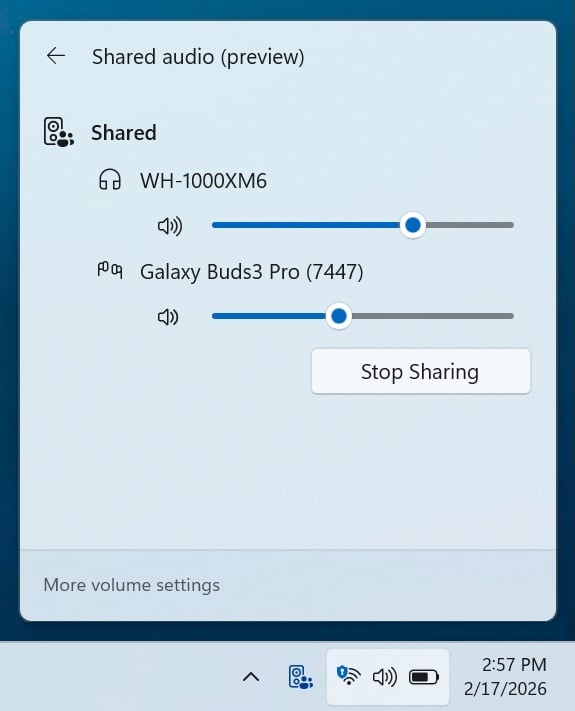
Previously, volume adjustments affected both users equally, but the new update adds individual volume sliders for each listener and device. A new taskbar indicator also appears during active sharing sessions to provide a visual reminder and a one-click shortcut to sharing settings.
The compatible device lineup has also expanded to include more Bluetooth LE Audio accessories, with the Samsung Galaxy Buds 4 and Buds 4 Pro, Sony WF-1000XM6, and Xbox Wireless Headset now also supporting the feature.
These new capabilities are rolling out to Windows Insiders in the Beta and Dev channels who have installed Windows 11 Preview Build 26220.7934 (KB5077242) and Windows 11 Preview Build 26300.7939 (KB5077243), respectively.

Modern IT infrastructure moves faster than manual workflows can handle.
In this new Tines guide, learn how your team can reduce hidden manual delays, improve reliability through automated response, and build and scale intelligent workflows on top of tools you already use.