


The 2026 State of Browser Security Report is now available, revealing how the browser has rapidly become the most critical and least protected control point in the enterprise. It also highlights 2025 as the tipping point when AI-native browsers shifted from experimental tools to mainstream business platforms.
Over the past twelve months, the browser evolved from a gateway to SaaS into something far more powerful and far more complex. AI copilots became embedded directly into business applications. Standalone generative AI tools became daily work companions. And a new class of AI-enhanced browsers began reshaping how users search, summarize, write, code, and automate tasks.
The browser is no longer just rendering web pages. It is reading data, generating content, executing workflows, and acting on behalf of users in real time. In many environments, it has effectively become the operating system for modern work.
Yet most enterprise security architectures have not evolved alongside it. The browser is still commonly treated as an extension of network controls or endpoint agents, leaving a growing blind spot in the very place where AI-driven work now happens.
This year’s findings show that the gap is widening rapidly.
AI Browsers and Copilots Go Mainstream
Generative AI is no longer experimental inside the enterprise. It is embedded directly into browser workflows.
Keep Aware’s 2025 telemetry shows that 41% of end users interacted with at least one AI web tool, with employees using an average of 1.91 AI tools per person. AI copilots and generative interfaces are now a routine part of how employees draft communications, analyze data, write code, and conduct research, all within browser sessions.

But adoption has outpaced governance.
While many organizations formally sanction specific AI platforms, real-world usage is fragmented. Employees often default to personal accounts for convenience or fewer restrictions, creating inconsistent oversight and policy enforcement inside the same browser environment.
AI usage also extends far beyond simple prompts. Employees are actively pasting and uploading internal documents, source code, financial information, and regulated data into AI systems, frequently outside the visibility of traditional security controls.
As AI-native browsers and embedded copilots continue to expand, the browser has become the primary layer where automation, productivity, and data risk intersect. Security strategies that fail to account for that shift risk losing visibility into the most active execution layer in the enterprise.
When AI usage, SaaS activity, and in-session behavior are visible in real time, security teams can detect threats earlier, prevent sensitive data loss, and enforce policy with precision.
Request a demo to see how Keep Aware brings true browser-native visibility and control to your environment.
Sensitive Data Exposure Is Happening in “Trusted” Apps
The report also challenges the assumption that data loss is effectively prevented by enforcing sanctioned applications.
During a one-month snapshot for authenticated sessions:
- 54% of sensitive inputs to web apps were sent to corporate accounts
- 46% were sent to personal accounts and unverified work accounts
Sensitive uploads were heavily concentrated in common enterprise platforms such as SharePoint, Google services, Slack, Box, and collaboration tools, but often accessed under personal identities and thus outside of enterprise governance.
This overlap makes application-based blocking ineffective. The risk is less about which SaaS app is accessed and more about how and under which account it is accessed.
Traditional DLP solutions, designed around email gateways, network inspection, or endpoint file monitoring, were not built to inspect typed inputs, pasted data, or file uploads occurring directly inside browser sessions.
Browser-Based Attacks Are Bypassing Traditional Controls
As defenders focused on strengthening email, network, and endpoint defenses, attackers shifted their tactics into the browser itself.
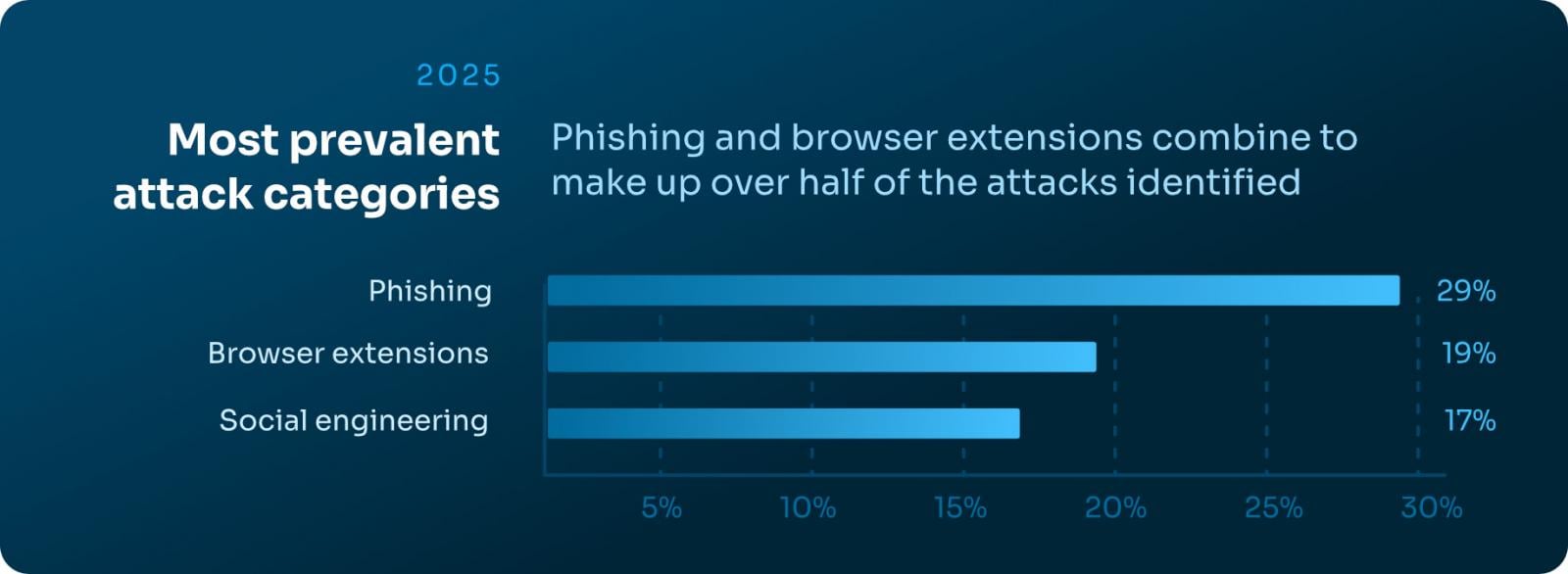
Keep Aware observed the following primary attack categories in 2025:
- 29% — Phishing
- 19% — Suspicious or malicious browser extensions
- 17% — Social engineering
Additionally, phishing domains had a median age of over 18 years, demonstrating that blocking “new” domains is no longer a reliable defense when attackers abuse long-standing trusted infrastructure.
Modern campaigns frequently rely on cloaking, chained redirects, CAPTCHA gates, and conditional execution to ensure scanners and threat feeds do not observe the same malicious content delivered to victims.
The result: a significant detection gap that only becomes visible inside the victim’s browser session itself.
Extension Risk Remains Widespread
Browser extensions remain one of the most overlooked and under-governed risk vectors inside the enterprise browser. While often viewed as harmless productivity boosters, extensions introduce persistent, highly privileged code directly into user sessions — often without continuous oversight.
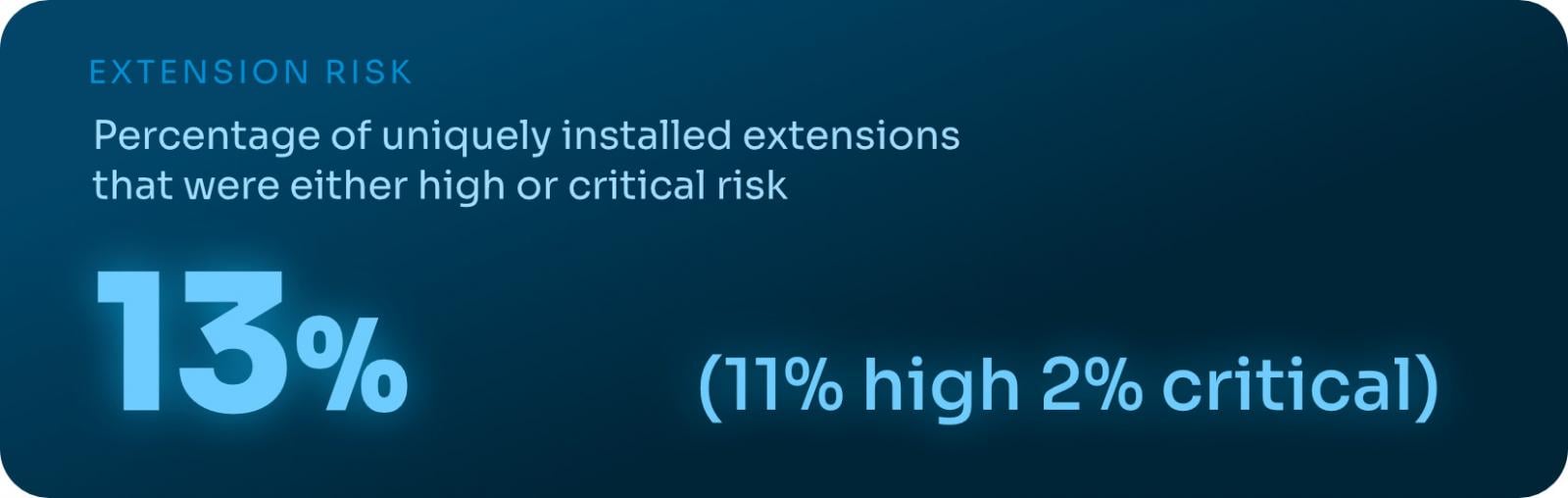
Keep Aware’s 2025 telemetry found that 13% of unique installed extensions were classified as High or Critical risk, underscoring how frequently dangerous add-ons make their way into production environments.
The issue isn’t just overtly malicious extensions. Marketplace labels provide little meaningful security signal, and branding often masks elevated permission requests and risky behavior.
Many extensions categorized as “productivity” tools request broad access to tabs, cookies, storage, and web requests, effectively granting deep visibility into browsing activity and sensitive data.
As extension ecosystems grow and evolve, static allowlists and point-in-time reviews are increasingly ineffective. Managing extension risk now requires continuous visibility into permissions, updates, and real-world behavior inside the browser itself.
Download the Full 2026 Report
The State of Browser Security Report 2026 provides a detailed analysis of AI usage trends, sensitive data exposure patterns, phishing detection gaps, extension risk, and emerging browser-based attack techniques.
To explore the full findings and recommendations, download the complete report here:
Download the 2026 State of Browser Security Report
Sponsored and written by Keep Aware.