


Microsoft is warning that a recent Microsoft Edge browser update introduced a bug that breaks right-click paste in chats in the Microsoft Teams desktop client.
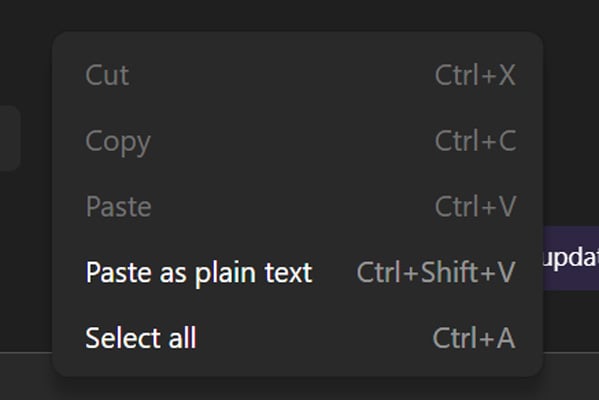
In an advisory published on April 14, Microsoft says users are reporting that they are unable to paste URLs, text, or images into Teams chats when using right-click context menus, with the “Paste” option greyed out.
To work around the bug, Microsoft says users can still copy and paste content using keyboard shortcuts: Ctrl + C and Ctrl + V on Windows, or Cmd + C and Cmd + V on macOS.

“Impacted users report that they are unable to copy and paste URLs, text, and images in Microsoft Teams desktop client chats, as the paste option appears greyed out when using the right-click dropdown menu method,” explains Microsoft.
“To bypass impact, we recommended that users attempt to copy the intended URLs, text, and images using Ctrl + C and paste using Ctrl + V for Windows, and corresponding Cmd + C and Cmd + V for Mac.”
Microsoft says the bug is caused by a recent browser update that introduced a code regression in Microsoft Edge, which Microsoft Teams uses for certain functionality.
Admins on Reddit and the Microsoft forums report that the problem is affecting users in corporate environments as well as individual users.
“I have multiple users on version 26072.519.4556.7438 experiencing this issue, including myself. Cannot right-click Paste, but CTRL+V and paste as text are allowed,” an admin posted to the Microsoft Forums.
Other users said that reinstalling Teams or clearing the cache did not fix the problem.
Microsoft says it identified the cause and is rolling out a fix in stages while monitoring telemetry to confirm that systems are recovering.
As of the latest update on April 16, Microsoft has not provided an exact timeline for when the fix will be fully rolled out.

AI chained four zero-days into one exploit that bypassed both renderer and OS sandboxes. A wave of new exploits is coming.
At the Autonomous Validation Summit (May 12 & 14), see how autonomous, context-rich validation finds what’s exploitable, proves controls hold, and closes the remediation loop.