
Microsoft has released emergency updates to fix a known issue causing some Dell PCs to experience performance issues or shut down after installing the July 2026 Windows 11 security updates.
As detailed when Microsoft acknowledged the issue on Tuesday, it affects only Dell systems that have installed the KB5101650 cumulative update on Windows 11 25H2 and 24H2 devices.
However, the root cause is a change introduced in the June 2026 KB5095093 preview cumulative update that triggers a conflict between the new Windows USB-C Connection Manager interface and the Intel Innovation Platform Framework (IPF) Processor Participant driver (a core system-level hardware driver that manages system power and thermals).

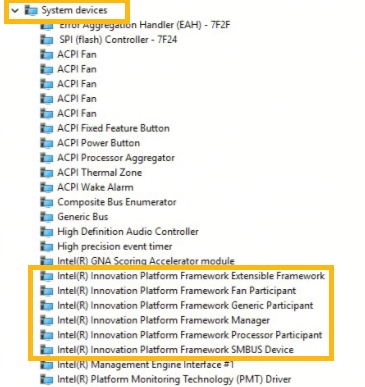
Because of this incompatibility, on affected devices, Windows displays a yellow exclamation mark in Device Manager next to the Processor Participant driver.
“After installing the June 23, 2026, Windows preview update (KB5095093), a limited number of Dell devices might display a yellow exclamation point in Device Manager next to the Intel Innovation Platform Framework Processor Participant driver. These devices can potentially experience unexpected shutdowns, poor performance, increased heat, and battery drain,” Microsoft said.
“This issue was reported by Dell during testing and identified as an incompatibility between the Intel driver and the new Windows USB-C Connection Manager interface introduced in the June 23, 2026, Windows preview update (KB5095093).”
To prevent these issues, Microsoft blocked the update on affected Dell systems until a fix was available.
On Saturday, three days after confirming this known issue, Microsoft released two emergency updates that fix it on Dell PCs running Windows 11 25H2 and 24H2 (KB5121767) and Windows 11 Enterprise LTSC 2024 (KB5121768).
“This update addresses an issue affecting a limited number of devices with an Intel Innovation Platform Framework (Intel IPF) driver that could cause changes in performance, power consumption, or system behavior after installing recent Windows updates,” Microsoft said.
“A limited number of Dell devices that were temporarily prevented from receiving the July 2026 security update KB5101650 can now install this OOB update. This OOB update is only recommended for devices affected by this issue. If your device is not affected, no action is required.
Devices managed by Windows Autopatch with hotpatch updates enabled will receive this emergency update automatically, while IT admins who use Microsoft Intune can speed up its deployment using the guidance available here.
Windows users who have not yet installed the July 2026 security update will also be required to restart their devices.

Security teams log 54% of successful attacks and alert on just 14%. The rest move through your environment unseen.
The Picus whitepaper shows how breach and attack simulation tests your SIEM and EDR rules so threats stop slipping by detection.